How to connect your email address to Konvart
Connected email addresses are used to send pitches to journalists in the Digital PR tool and outreach emails in the Outreach Support tool.
For now, we only support SMTP set-up for email connection.
To connect your email, navigate to "Account Settings" and click on "Integrations", then click on "Add Email"
Select "Other Providers Custom Domain". This also applies if you are using Gmail or Google Workspace, as you can use SMTP on your Google account
Then, enter your name, email address, password for the email address, Host for the email, and Port for SMTP and IMAP. 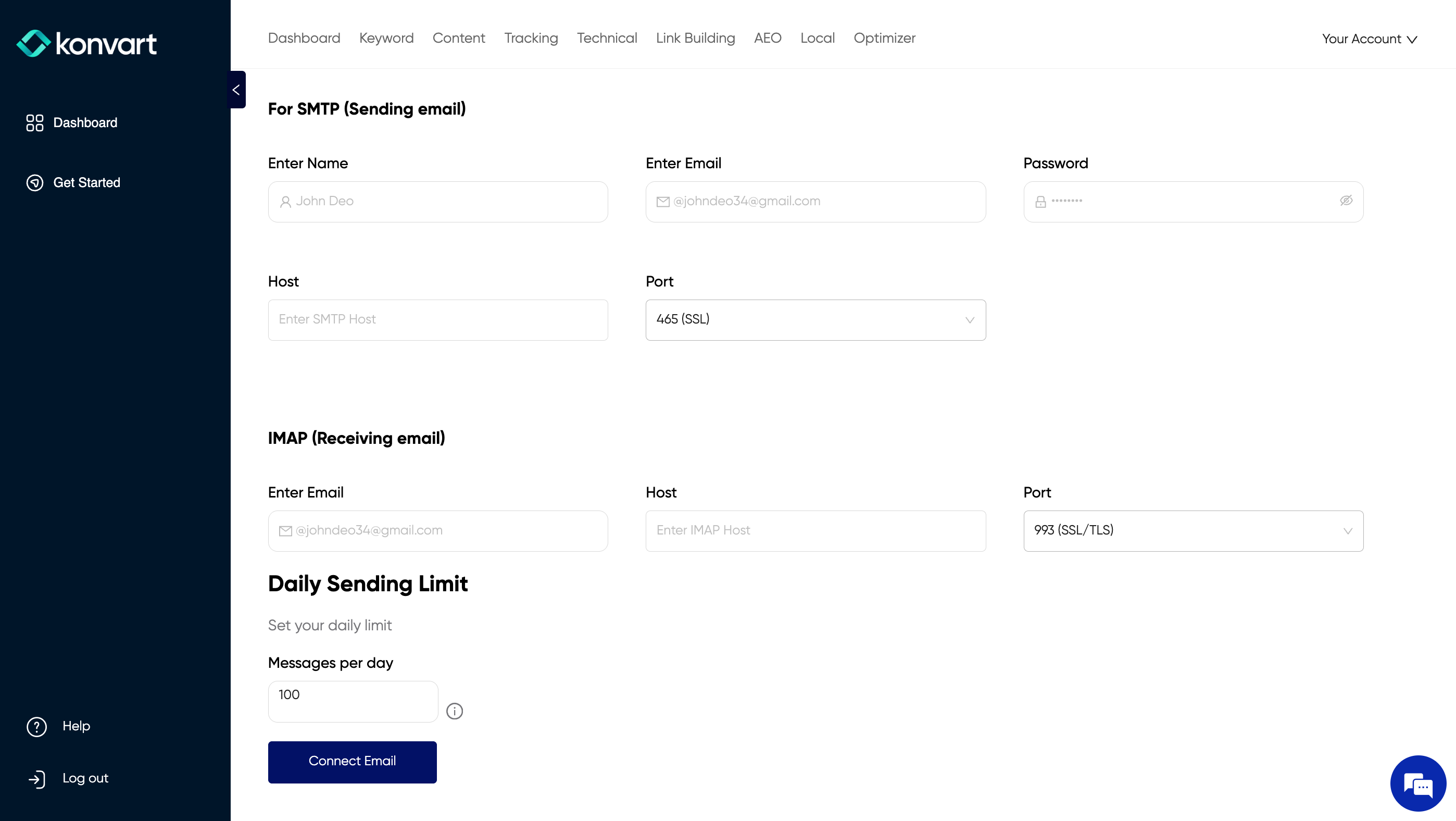
You can also change your limits. Your limit per email address is 50 or 100 by default, depending on your plan. This number is recommended for link-building-related emails to protect the deliverability and reputation of your email and domain name. You can reduce this number on Konvart, but 50 or 100 is the max.
Click on "Connect Email"
Access Konvart
Related Articles
Manage Team Members
You can share an account with team members. To add team members to your account, click on "Your Account" at the top right, then "Account Settings". On Account Settings, click on "My Team" Then enter the email address of the team member you want to ...